
Signing up on Glory Casino — what to do and what to skip
Registration on Glory Casino BD hub is genuinely fast — under two minutes if you don't get distracted. The catches are around the welcome bonus timing (one hour from signup) and around KYC, which most people put off and then regret when their first cashout is held. Below: the actual signup flow, the login bits, KYC with NID and TIN, plus the trap to avoid with the welcome bonus selection. The full audit of every promo lives on the full bonus catalogue.
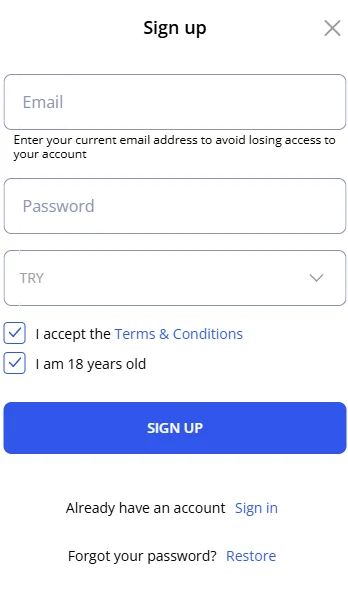
Registration — Step-by-Step (4 Steps)
Open the Glory Casino site
Visit the official website from a desktop browser or mobile device. Click the "Sign Up" button in the top-right corner. The registration form opens in a modal.
Fill in your details
Choose signup method: Email, Phone or social (Google/Telegram). Enter your full name as it appears on your NID, date of birth (must be 18+), password (minimum 8 characters with a number and a special character) and select BDT as your currency.
Choose your welcome bonus
Select Casino Welcome (125% up to ৳37,000 + 250 FS) or Sports Welcome (100% up to ৳20,000). The choice can be changed later only with support approval — pick carefully.
Verify and deposit
Confirm the link in your email OR the SMS code to your phone. Then go to Wallet → Deposit — the the deposit walkthrough covers every wallet. Pick a method (bKash via bKash deposit instructions, Nagad, Rocket or Upay), deposit ৳500 or more within one hour of registration. The bonus credits automatically.
Choose Your Welcome Bonus
| Casino Welcome | Sports Welcome | |
|---|---|---|
| Bonus | 125% + 250 FS | 100% match |
| Maximum | ৳37,000 | ৳20,000 |
| Min deposit | ৳500 | ৳600 |
| Wagering | 50× in 48 hours | 5× rollover, 14 days |
| Best for | Slot & crash players | Cricket & sports bettors |
KYC Verification
All Glory Casino players must complete KYC (Know Your Customer) verification before withdrawing winnings. This is a standard anti-fraud practice for all regulated online casinos. Verification typically takes 24–48 hours once documents are submitted.
Documents Required for Bangladeshi Players
| Document | Accepted Formats | Purpose |
|---|---|---|
| NID (National ID Card) | Photo (front + back) | Identity |
| TIN (Tax Identification Number) | Clear photo or PDF | Tax ID |
| Bank statement / Utility bill | PDF or photo (<3 months) | Address proof |
| Selfie with NID | Clear photo | Liveness check |
How to Submit KYC
Log in → Account → Verification → upload each document in the requested slot. The support team reviews within 24–48 hours and notifies you via email. If rejected, you will receive clear reasons (most common: poor image quality or name mismatch between NID and account).
Glory Casino Login
Once registered, logging in is fast. Open the login screen, enter your email or phone + password, and you are in. Optional: enable 2-factor authentication (2FA) under Account → Security for extra protection. The native app supports biometric login (fingerprint, Face ID) after first setup. After clearing wagering you'll move on to Aviator quick-bet guide or one of the slots covered in the loyalty programme.
Forgot Password?
Click "Forgot password?" on the login screen. Enter your registered email, check inbox for the reset link (valid 24 hours), create a new password. If the email does not arrive, check spam or contact support via live chat.
Account Security Tips
- Use a strong, unique password — do not reuse from other accounts.
- Enable 2FA for an extra layer of protection.
- Never share your password — Glory Casino support will never ask for it.
- Keep your email account secure — it is the primary recovery channel.
- Log out from shared devices — especially public computers and internet cafés.
- Check devices under Account → Security — log out any unrecognised device.
Stuff that goes wrong during signup
Form: 90 seconds if you're not distracted. Email/SMS verification: instant in 99% of cases. KYC: 24 to 48 hours after you upload docs — and you can play with the bonus before KYC clears, but you can't cash out.
NID front and back, TIN, one address proof (bank statement or utility bill less than 3 months old), one selfie holding your NID next to your face. Phone camera is fine, just make sure all four corners of every document are visible and the text is readable.
Only before your first deposit. After deposit, the choice is locked. If you're not sure which path to pick — message live chat before you deposit. They can switch you no problem if you haven't funded yet.
Nope. Free account creation, free to browse. You only put money in when you deposit for play.
Spam folder first, that's where 70% of these end up. Still nothing after 5 minutes — hit "Resend verification email" on the login screen. Still nothing — open live chat and check your email spelling with them. I've seen people type their .com as .con and wait three hours wondering what's wrong.
Technically yes, but it triggers AML review. If you both pass KYC with different NIDs and different bKash numbers, you're fine. If anything looks shared (same payment source, same phone number), one or both accounts get frozen pending manual review. Don't try to bonus-stack across both — that's the bit that gets caught.